1. Download and inspect the working example
Download both files before you begin. The workbook contains four sanitized records and a Boxes column with values 2, 4, 1 and 3. That column produces ten labels in total. The project JSON supplies the matching 76 × 50 mm layout with mapped text and Code 128 fields.
Before using your own file: keep one record per row, use a single header row, remove merged cells, and format SKU, UPC, EAN, tracking and serial columns as text so leading zeroes survive.
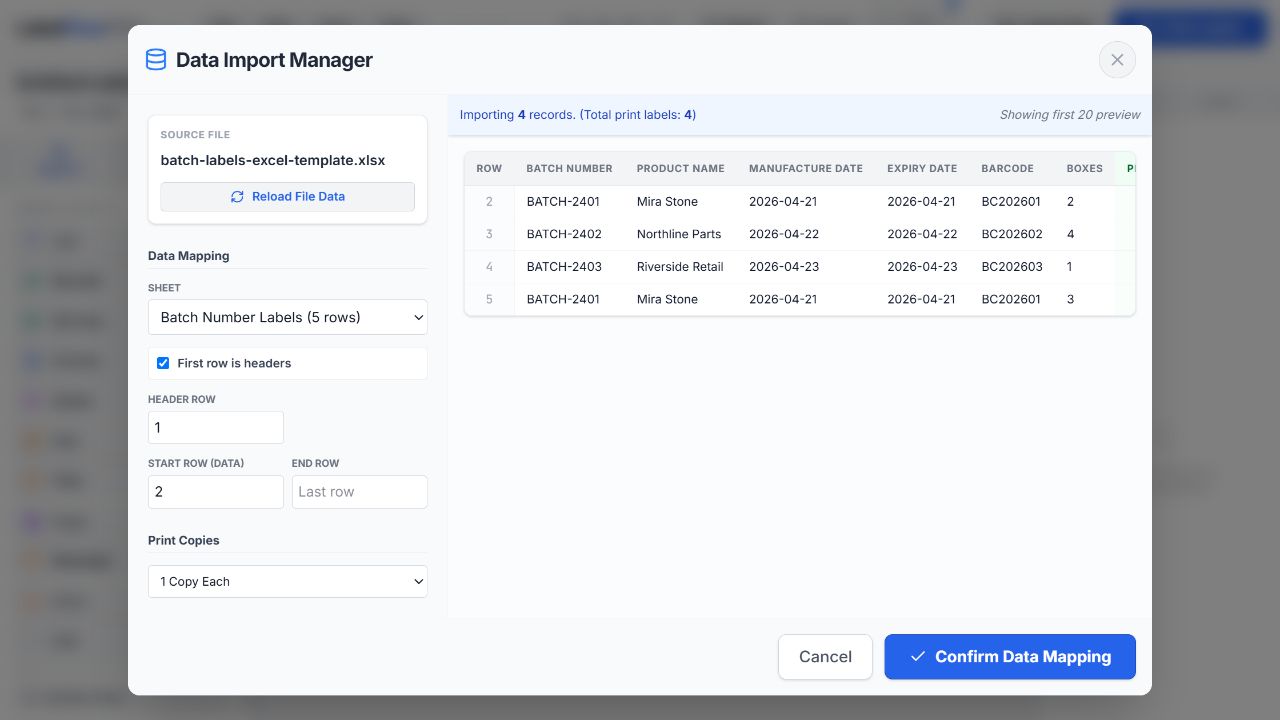
Import CSV, XLS or XLSX and select the real data range
- Open LabelFlow Pro and choose Data → Load Data (Excel/CSV).
- Select the worksheet that contains the label records—not the Instructions sheet in the sample.
- Leave First row is headers enabled when row 1 contains field names.
- Set Header Row, Start Row and, when needed, End Row. Use the preview table to confirm that headers and values line up.
- Choose Confirm Data Mapping.
Configure physical label dimensions and DPI
Open Project Settings and enter the physical width and height printed on the label roll or sheet specification. Choose millimetres or inches, then match the printer resolution—commonly 203, 300 or 600 DPI. The sample project uses 76 × 50 mm at 203 DPI.
- For thermal rolls, the project size and printer-driver stock size must match.
- For A4 or Letter sheets, the individual label size, gaps, margins and page size all affect alignment.
- Do not compensate for a driver scaling problem by distorting the label design. Keep browser and driver scaling at 100% or Actual Size.
Bind text, barcode, QR and image elements to spreadsheet columns
Open the Data sidebar after import. Add or select a label element, then use the corresponding spreadsheet field as its dynamic value.
- Text: combine fixed words and fields, such as
Batch: {{Batch Number}}. - Barcode: select the required format and bind the content to a field such as
{{Barcode}}. LabelFlow Pro exposes 23 selectable code types; the source value must still be valid for the chosen symbology. - QR code: bind a URL, identifier or other QR-safe value from a worksheet column.
- Row-specific image: add an Image element and bind it to the column containing the image URL or file path. Test access to every image before a production run.
Choose fixed copies or a different quantity for every row
Return to Data → Data Mapping and choose one of three copy modes:
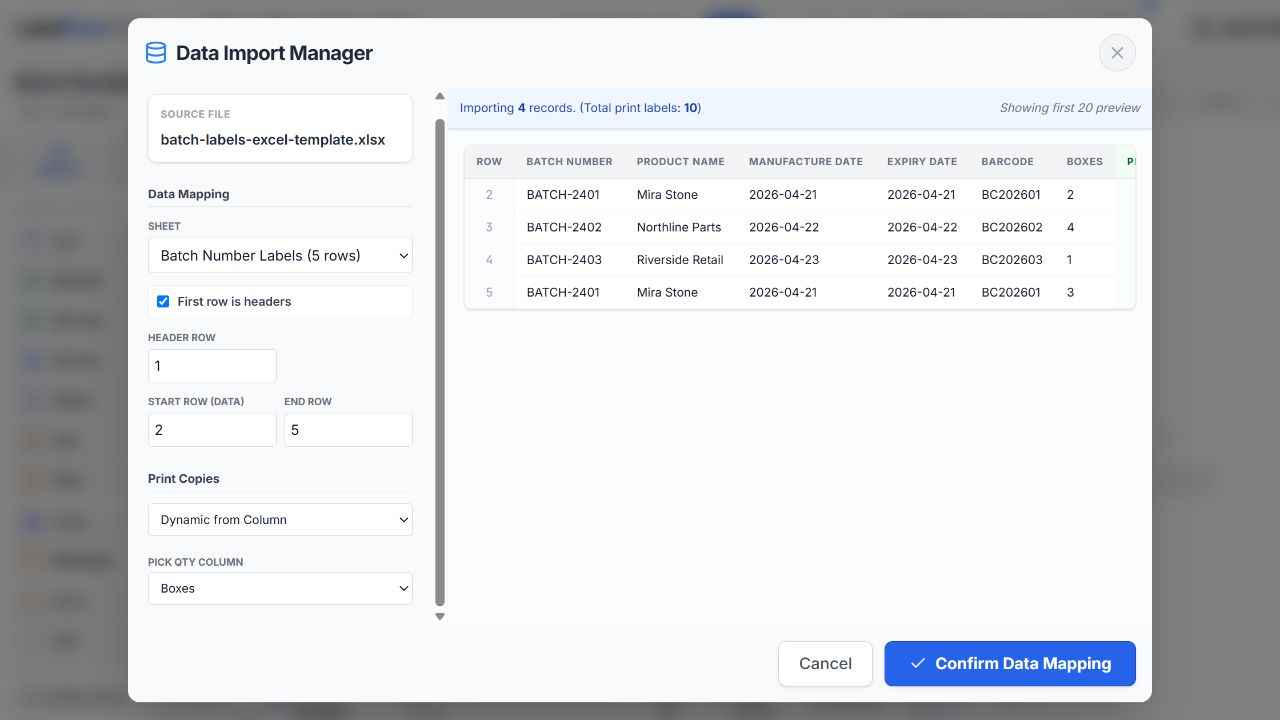
- 1 Copy Each prints one label for every imported row.
- Fixed Copies repeats every row by the same number.
- Dynamic from Column reads the quantity from a field such as
Boxes,Pack,CartonsorPallets.
In the sample, select Dynamic from Column → Boxes. The preview total changes from four records to ten print labels.
Build multi-field formulas and packaging counters
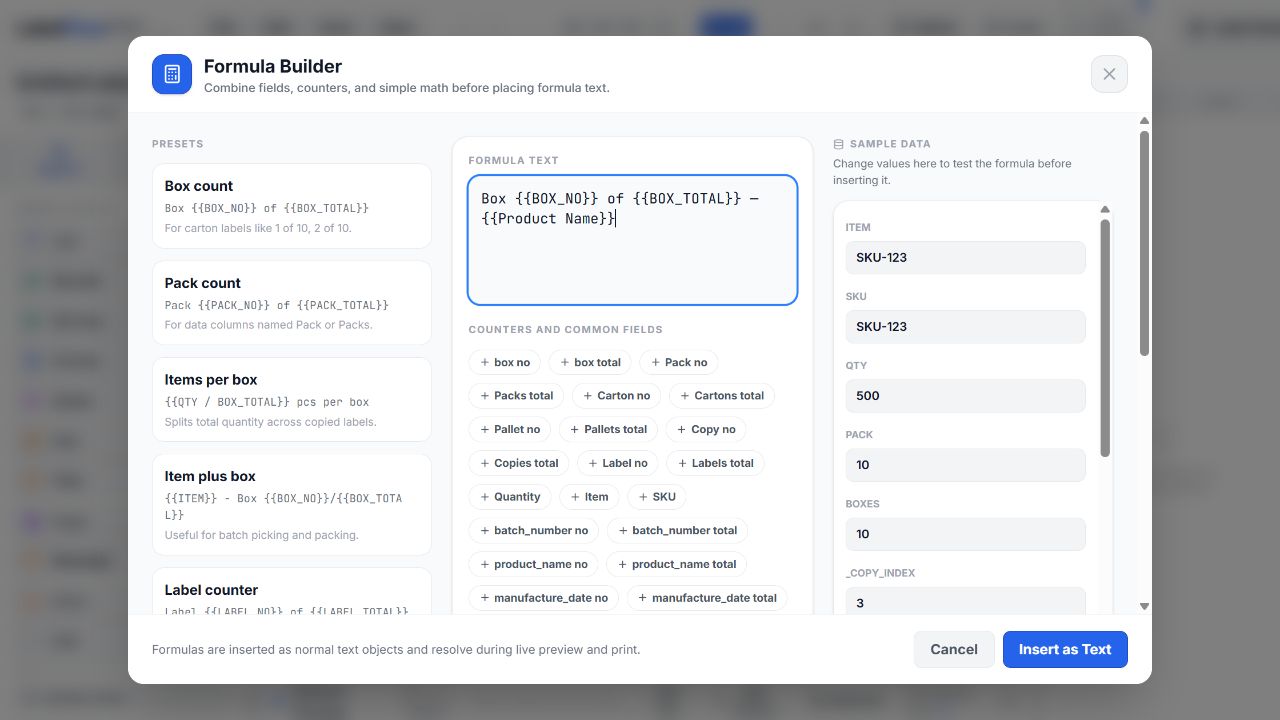
Choose Formula in the Objects sidebar. Formula Builder can combine fixed text, multiple spreadsheet columns, copy counters and simple numeric expressions in one text object. Start with a preset or enter a formula directly, then use the dry-run values to verify it before insertion.
For the sample, try:
Box {{BOX_NO}} of {{BOX_TOTAL}} — {{Product Name}}
Each copied label receives the current box number and the row total. A dynamic column named Pack, Carton or Pallet also enables the matching natural aliases. Supported helpers include round(), ceil(), floor(), min(), max() and abs(); for example {{ceil(QTY / BOX_TOTAL)}} pcs.
For a focused packaging example, continue with the Box 1 of 10 tutorial.
Preview the records most likely to fail
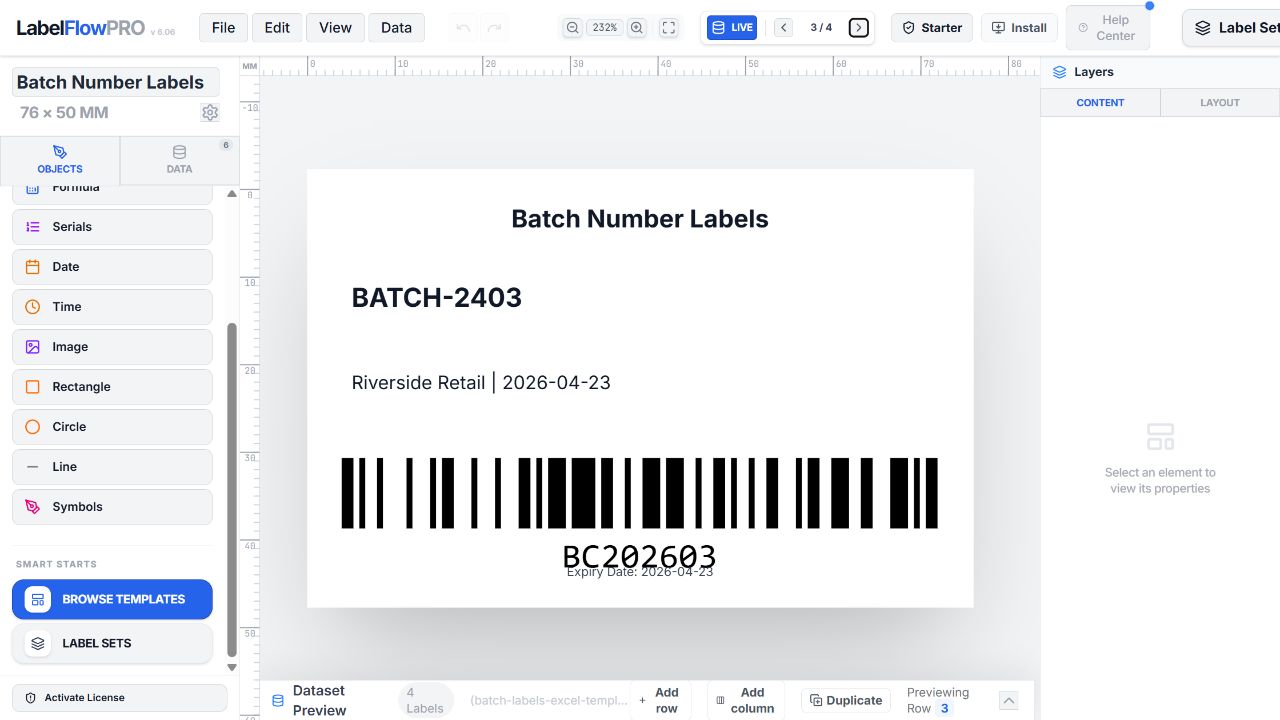
Use the previous and next record controls above the canvas and the Dataset Preview at the bottom of the editor. Do not review only row 1. Deliberately inspect:
- the longest product or recipient name;
- the longest barcode or QR value;
- a row with an empty optional field;
- values with accents, symbols or non-Latin characters;
- the row with the largest print quantity.
Print thermal labels or A4/Letter sheets—or download PDF
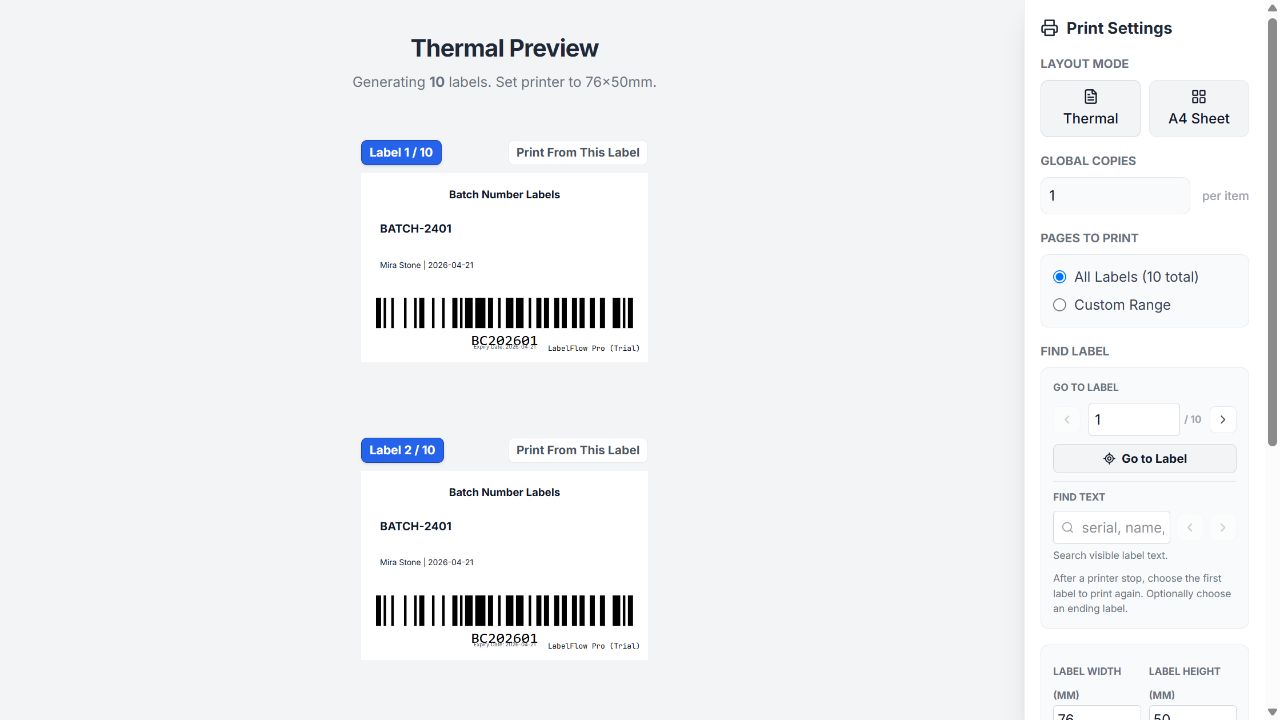
- Choose Print Labels.
- Select Thermal for one label per roll position or A4 Sheet for sheet layouts. Letter is available through the sheet page-size controls.
- Confirm the generated-label total, label dimensions, margins, global copies and print range.
- Use Print Now to continue through the browser and operating-system print dialog, or Download PDF to save the prepared output.
- Print one test page or a short label range before releasing the full batch.
Save the reusable project JSON
Choose File → Save Project when the layout, mappings and settings are correct. Keep the downloaded project JSON with the approved source workbook and a printed test label. On the next run, use File → Open Project, load the new spreadsheet data, verify mappings and preview the changed records before printing.
warehouse-carton-label-2026-09.json. The source spreadsheet remains a separate file.Production checklist
- Headers and data start row are correct
- Identifiers are stored as text
- Label dimensions match the physical stock
- DPI matches the target printer
- Every element is bound to the intended field
- Dynamic copy totals match the workbook
- Long and empty values have been previewed
- Barcodes and QR codes pass a scan test
- Browser and printer scaling are 100%
- A short physical test batch is approved
Troubleshooting Excel label printing
| Problem | Likely cause | What to check |
|---|---|---|
| Headers appear as label values | The data start row includes the header row | Enable First row is headers and set Start Row to the first actual record. |
| Leading zeroes disappear | Excel treated an identifier as a number | Format the source column as Text, re-enter the values, then import again. |
| Every row prints once | Copy mode is still 1 Copy Each | Choose Dynamic from Column and select the correct numeric quantity field. |
| Barcode is blank or invalid | The value does not meet the selected symbology rules | Check allowed characters, required length and check-digit expectations; try Code 128 for general alphanumeric data. |
| Text overflows only on some labels | The previewed row was not the longest record | Preview the longest values and use the element's text-fit controls or a larger field area. |
| Print is shifted or scaled | Driver stock size, page size or scaling differs from the project | Match dimensions and margins, disable Fit to Page, and print at 100% or Actual Size. |
| Row image does not load | The URL/path is inaccessible to the browser | Open the source directly, verify permissions and protocol, and test every unique image source. |
Capability boundaries to plan around
Printing uses the browser and system driver
LabelFlow Pro prepares thermal and sheet layouts, then relies on the browser and operating-system print path. It does not provide native ZPL/EPL printer management, RFID encoding or managed printer-fleet status.
PDF is the independent file output
The Print Settings screen can download PDF. This workflow does not promise finished-label PNG or SVG export.
Spreadsheet edits are non-destructive
Dataset Preview can adjust the browser working copy, but it does not write changes back into the imported Excel workbook.
Carrier postage is separate
You can design and print shipping labels from spreadsheet fields, but carrier postage purchase, rate shopping and shipment booking are not part of this workflow.
Frequently asked questions
Can LabelFlow Pro import XLSX without converting it to CSV?
Yes. LabelFlow Pro imports XLSX, legacy XLS and CSV files directly.
Can each Excel row print a different number of labels?
Yes. Select Dynamic from Column in Data Mapping and choose the spreadsheet column that contains each row's copy count.
Can a formula use more than one spreadsheet column?
Yes. Formula Builder can combine fixed text, multiple dataset fields, copy counters and supported arithmetic helpers in one text object.
Can I print to thermal printers and A4 or Letter sheets?
Yes. Use Thermal mode for roll labels or sheet mode for A4 and Letter layouts, then print through the browser and operating-system printer dialog.
Can I download a PDF instead of printing immediately?
Yes. The Print Settings screen includes a Download PDF action.
Does editing Dataset Preview change the original workbook?
No. Dataset Preview changes the browser working copy only and does not write back to the source Excel file.